[ez-toc]
AI transcription turns spoken audio into written text without a person typing every word. Behind the simple result is a chain of steps: the audio is broken into short pieces, sounds are matched to words, language rules choose the most likely wording, and the text is then organised with punctuation, speaker labels, and timestamps. Understanding how AI transcription works helps you choose the right tool, set it up correctly, and know where to check the result instead of trusting it blindly.
This guide explains the technology, not a single product. It does not compare tools against each other. For a comparison of two well-known tools, see our guide on Whisper vs Otter.ai. Here the focus is on what happens inside automatic speech recognition, why some recordings transcribe well and others do not, and what a human editor still needs to check.
What Automatic Speech Recognition Means
Automatic speech recognition, usually shortened to ASR, is the technology that converts spoken language into text. Speech recognition is a field of computational linguistics concerned with methods that translate spoken language into text or another interpretable form, as described in the speech recognition overview on Wikipedia. In practice, an ASR system listens to audio, works out which sounds were spoken, and then decides which words those sounds most likely form. It does this in milliseconds for short clips and in sections for long recordings.
AI transcription is one use of ASR. Other uses include voice commands, dictation, and live captions. The difference is the output: a voice command needs only the intent, while a transcript needs every word, in order, with punctuation and speaker changes. That is why a system that understands commands well can still produce a transcript that needs editing. The transcript is a record, so accuracy, names, numbers, and wording all matter more than in a command.
Step 1: Audio Is Split Into Short Frames
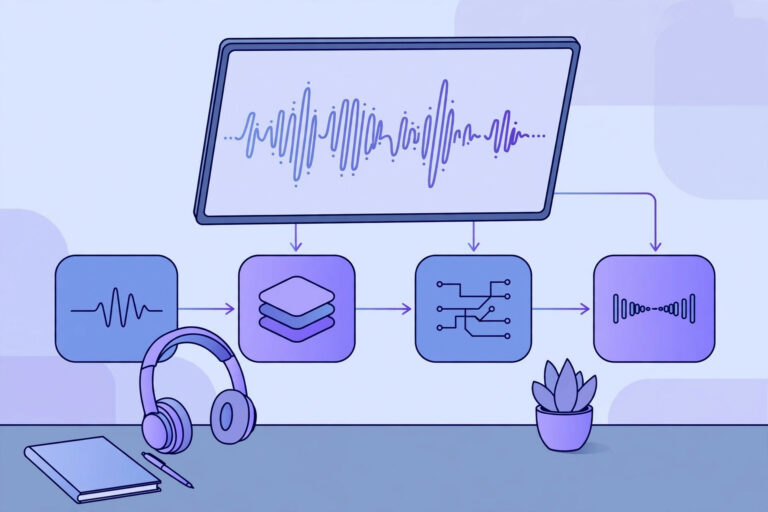
The first step is to prepare the audio. The recording is divided into very short frames, often around 10 milliseconds each, and each frame is turned into a set of numbers that describe its sound. This step removes silence, reduces background noise where possible, and marks where speech starts and stops. A clean recording made close to the speaker gives the system clear frames to work with. A distant recording in a noisy room gives it mixed sound, and errors made at this stage carry through the rest of the process.
File format and quality also matter at this stage. Most transcription systems accept common formats such as MP3, MP4, M4A, and WAV, and higher-quality audio usually helps. The same preparation steps that help any transcription apply here, including the file and quality checks in our guide on how to transcribe MP3 audio to text. If the audio is poor, no amount of clever language modelling later can recover words that were never clearly recorded.
Step 2: An Acoustic Model Matches Sounds to Speech Units
Next, an acoustic model looks at each frame and estimates which speech sounds it contains. Speech sounds are the smallest units of sound that distinguish words, such as the sounds in “pat” and “bat”. Modern acoustic models are neural networks trained on large amounts of recorded speech. They learn how the same sound varies between speakers, accents, speeds, and recording conditions. Older systems used statistical models for this step, and modern systems use deep learning models, including recurrent networks and transformers, which can use longer context from the surrounding audio.
The acoustic model does not output words directly. It outputs probabilities: for each short frame, how likely is each possible sound? A frame of a vowel sound might be likely to belong to several similar vowels, and the system keeps those possibilities open until later steps narrow them down. This is one reason why similar-sounding words, names, and technical terms are the most common errors. The system heard the sound correctly, but several words share almost the same sounds.
Step 3: A Language Model Chooses the Most Likely Words
A language model then takes the sound probabilities and decides which sequence of words is most likely. It uses knowledge of the language: which words follow each other, which phrases are common, and which spellings fit the context. For example, the sounds for “recognise speech” and “wreck a nice beach” are similar, but the language model favours the first in a sentence about transcription, because it fits the words around it. This step is where context, topic, and grammar turn raw sounds into readable sentences.
Language models are trained on large amounts of written text, and their strength depends on how well that training text matches your recording. A model trained mainly on general text will handle everyday conversation well but may struggle with medical terms, legal terms, or product names it rarely saw. Some systems let you supply a list of expected terms, names, or a short prompt about the topic, which helps the language model favour the right spellings. Even then, check proper nouns, numbers, and amounts against the audio, because those are the words a language model is least able to guess from context alone.
Step 4: Punctuation, Speaker Labels, and Timestamps Are Added
Once the words are chosen, the system adds punctuation, capital letters, and paragraph breaks so the text reads like writing rather than a stream of words. Punctuation is predicted from pauses, intonation, and sentence structure, so it is often close but not always right, especially in long, run-on speech. A separate process, speaker diarization, works out who spoke when, so the transcript can label each turn as Speaker 1, Speaker 2, and so on. Our guide to speaker diarization explains how those labels are made and why they need a human check, especially when speakers interrupt each other.
Timestamps are added by matching each word or sentence to its time in the audio. Word-level timestamps are useful for captions and for searching a recording, while sentence-level timestamps are enough for most reading and editing. Timestamps also make it possible to click a line of text and jump to that point in the audio, which is how interactive transcripts work. For more on why transcripts and captions help a page be found and used, see our guide on captions, transcripts, and accessibility.
How Modern AI Models Differ From Older Speech Recognition
Older speech recognition systems were built from separate parts, each trained on its own: one part for sounds, one for words, and rules to combine them. They often needed a period of training on one person’s voice before they worked well, and they struggled with new speakers. Modern AI transcription models are usually trained end to end on very large collections of audio and text, so they handle many speakers, accents, and topics without per-speaker training. The Whisper model, an open-source speech recognition model, is an example of this approach, and it is one of the systems compared in our Whisper vs Otter.ai guide. The model itself is only one part of a finished tool: the tool around it handles file upload, language settings, speaker labels, editing, and export.
Training data is the main reason modern models are both better and less predictable than older ones. A model trained on many hours of clear, studio-quality speech will do well on similar audio and less well on noisy phone calls or heavy accents that were rare in its training data. Models can also inherit gaps in their training data, such as weaker performance on some languages or dialects. That is why accuracy claims for a model or a tool should always be read with the test conditions in mind: the type of audio, the number of speakers, and the language. A claim measured on clean, single-speaker audio does not describe performance on a noisy meeting.
Why Accuracy Varies: Noise, Accents, Overlap, and Vocabulary
Four factors explain most accuracy differences. First, background noise and echo blur the sound frames, so the acoustic model is less sure about each sound. Second, accents and fast speech change how sounds are pronounced, and a model trained mainly on one accent will mishear others more often. Third, overlapping speech breaks the assumption that one person speaks at a time, so words from two speakers get mixed into one stream and speaker labels go wrong. Fourth, specialist vocabulary, names, and abbreviations may be rare in training data, so the language model favours a common word that sounds similar.
Long recordings add a fifth factor: context drift. In a two-hour meeting, the topic changes, new names appear, and speakers get tired and mumble. A system that processes the file in sections can lose context at section boundaries, so a name introduced early may be misheard later. For long files, the choice of tool and the way it handles long audio matter as much as the model itself, which is why our guide to the best transcription software for long audio looks at section handling and timestamps, not only headline accuracy.
Speech Analytics: What Happens After Transcription
Speech analytics is the analysis of a transcript after it is made: counting topics, finding questions, measuring talk time, or spotting sentiment. It works on the transcript text, so its results are only as good as the transcript. If a key word was misheard, the analytics will count the wrong word. Use speech analytics to find patterns across many recordings, such as common questions in support calls, and always check the underlying audio for any single finding that matters, such as a promise, a price, or a complaint. Analytics is a way to search and summarise, not a replacement for listening to the original when the exact wording matters.
What to Check Before You Trust an AI Transcript
Check the transcript in passes, not in one read. First, listen to a short sample while reading, and fix names, numbers, dates, and amounts. Second, check speaker labels at the start of the recording and wherever speakers change, because an early labelling error can run through the whole file. Third, read for punctuation and sentence breaks, especially where the speaker paused mid-sentence or ran sentences together. Fourth, check any passage marked unclear, and listen to it again at slower speed rather than guessing. Cloud speech recognition services describe this same workflow in their own documentation, including the Google Cloud Speech-to-Text documentation, which covers sending audio and receiving a text transcription from the API service.
Privacy is part of the check too. An AI transcription tool may process audio on its own servers, store it for a time, or use it to improve its models, depending on its terms. For sensitive recordings, check the privacy terms in writing before you upload, and prefer a tool that deletes files after delivery or works offline. Accuracy and privacy are both part of choosing a system, and the most accurate tool is not the right choice if its handling of your audio does not meet the rules that apply to your work.
Conclusion
AI transcription works by splitting audio into short frames, matching sounds with an acoustic model, choosing likely words with a language model, and then adding punctuation, speaker labels, and timestamps. Modern models handle many speakers and topics without per-speaker training, but they still struggle with noise, overlap, accents, and specialist vocabulary. Use the technology for a fast first draft, check names, numbers, and speaker labels against the audio, and keep the original recording until the transcript is approved. That workflow gives you the speed of AI transcription without trusting a draft that was never checked.
Is AI transcription the same as speech recognition?
Speech recognition is the technology that converts speech to text. AI transcription is one use of it, producing a written record of a recording with punctuation, speakers, and timestamps.
Why does AI transcription get names wrong?
Names are often rare in training data and sound similar to common words, so the language model favours the common spelling. Supplying expected names before transcription and checking them against the audio is the reliable fix.
Can AI transcription identify who is speaking?
It can label speaker turns through diarization, usually as Speaker 1, Speaker 2, and so on. A human editor replaces those labels with names, and should check the labels where speakers interrupt each other.
Limitations & Edge Cases
- Speech recognition predicts the most likely words; it does not understand what was said. Homophones and similar-sounding proper nouns are therefore a regular source of confident-looking errors that only a listener will catch.
- When two people speak at the same time, speaker labels become unreliable. The model may merge turns, split one speaker into two, or attach a sentence to the wrong person.
- Performance is uneven across accents, dialects, and specialist vocabulary. Everyday conversation in a widely used language is handled far better than a regional accent discussing technical subject matter.
- Punctuation, capitalisation, and sentence breaks in the output are inferred by the model, not present in the audio. A list, a question, and a statement can come out looking alike, which changes how a quotation reads.
An AI transcript is a strong first pass. Anything that will be quoted, published, or relied on in a decision still needs to be read against the recording.
What is automatic speech recognition (ASR)?
Automatic speech recognition, usually shortened to ASR, is the technology that converts spoken language into text. In practice, an ASR system listens to audio, works out which sounds were spoken, and then decides which words those sounds most likely form.
How does AI transcription work, step by step?
Audio is split into short frames, often around 10 milliseconds. An acoustic model matches the sounds in each frame to speech units. A language model then chooses the most likely sequence of words. Finally, punctuation, speaker labels, and timestamps are added.
Why does accuracy vary between recordings?
Background noise and echo blur the sound, accents and fast speech change how words sound, overlapping speech makes speaker labels unreliable, and specialist vocabulary, names, and abbreviations are often rare in training data. In long recordings, context can also drift as topics and names change.
What is speech analytics?
Speech analytics is the analysis of a transcript after it is made: counting topics, finding questions, measuring talk time, or spotting sentiment. The results are only as good as the transcript they come from.
What should you check before you trust an AI transcript?
Check in passes: listen to a short sample while reading and fix names, numbers, dates, and amounts; check speaker labels; read for punctuation and sentence breaks; check passages marked unclear by listening again; and check privacy terms before uploading sensitive recordings.